Building a Data Protection and Recovery Plan: 7 Steps to Resilience
Scopri di più su Commvault e su come possiamo aiutarti a definire subito la tua strategia di risposta al ransomware! Contatta subito un nostro rappresentante!

A data protection and recovery plan defines how an organization backs up, protects, restores, and validates access to critical data after disruption. It typically includes recovery objectives, backup policies, roles, testing procedures, and response steps for incidents such as outages, data loss, cyberattacks, or system failures.
Organizations have never had more data to protect — or more ways to lose access to it.
As businesses expand across hybrid cloud environments, SaaS applications, containers, and edge infrastructure, data protection has become significantly more complex. At the same time, ransomware attacks, system outages, human error, and data corruption continue to threaten business operations. While many organizations invest heavily in backup technologies, backups alone do not guarantee recovery. The real challenge is ensuring critical systems and data can be restored quickly and cleanly when disruption occurs.
What Is Recovery Readiness?
Recovery readiness is an organization’s ability to restore critical data, applications, and business operations within predefined recoveryobiettiviafter a disruption. While backups are an important part of resilience, recovery readiness focuses on whether systems canactually berecovered quickly, accurately, and at scale when needed.
A recovery-ready organization understands not only what data is protected, but also how systems will be restored, in what order workloads will be recovered, and whether recovery processes have beenconvalidatothrough testing.
Two key metrics shape recovery planning:
- Recovery Point Objective (RPO):La regola di backup 3-2-1maximumamount of data loss an organization can tolerate, measured in time. For example, an RPO of one hour means backups and replication strategies must ensure no more than one hour of data is lost during recovery.
- Recovery Time Objective (RTO):The maximum acceptable downtime before a workload or service must be restored. A critical customer-facing application may require an RTO of minutes, while less critical systems may tolerate several hours of downtime.
Questiobiettivi puòdirectly influence backup frequency, infrastructure investments, replication strategies, and recovery procedures. Workloads with aggressive RPO and RTO requirements often require technologies such as continuous data protection, automated failover, immutable backups, and dedicated recovery environments.
RecoveryReadinessdovrebberoalsorichiedereregular validation. Organizations should routinely test recovery workflows, verify workload dependencies, assess recovery performance against RPO and RTO targets, and confirm that clean recovery pointsrimanereavailablenel caso in cuiransomware, data corruption, or infrastructure failures.
How to Build a Data Protection and Recovery Plan
An effective data protection and recovery plan goes beyond creating backups. Organizations need a structured framework that protects critical data, reduces cyber risk, and helps recover business operations when disruptions occur.
1. Identify and Prioritize Critical Data and Workloads
Start by inventorying the applications, databases, cloud services, and infrastructure that support business operations. Classify data based on business value, sensitivity, regulatory requirements, and operational importance.
As part of this process, perform workload dependency mapping to identify relationships between applications, databases, virtual machines, cloud resources, and supporting services. Understanding these dependencies helps promote recovery efforts that restore entire business processes—not just individual systems.
2. Define Recovery Objectives
Establish clear recovery goals for each workload by defining:
- Recovery Point Objective (RPO):La regola di backup 3-2-1maximumacceptable amount of data loss, measured in time.
- Recovery Time Objective (RTO):The maximum acceptable downtime before operations must be restored.
Critical workloads may require near-zero RPOs and rapid recovery, while less critical systems can often tolerate longer recovery windows.
3. Implement Layered Data Protection
Modern data protection strategies rely on multiple layers of resilience rather than a single backup copy.
Best practices include:
- Maintaining multiple backup copies acrossdifferent locations
- Using immutable backups that cannot bemodificatoor deleted during a defined retention period
- Storing recovery data in separate environments to reduce operational risk
- Protecting cloud, SaaS, on-premises, and hybrid workloads through consistent policies
This layered approach helps clean recovery points remain available even if production systems are compromised.
4. Establish Air-Gapped Recovery Capabilities
Organizations shouldmantenereat least one recovery environment isolated from production infrastructure.
Air-gapped recovery environments create a logical or physical separation between production systems and backup data, helping prevent ransomware and other threats from spreading to recovery assets. These environments provide a trusted recovery location when primary systems are unavailable or compromised.
5. Create and Document Recovery Procedures
Recovery plans should clearly define:
- Roles and responsibilities
- Escalation paths
- Recovery workflows
- Communication procedures
- Validation and testing requirements
Documented procedures reduce confusion during high-pressure recovery scenarios and help teams respond more consistently.
6. Test and Validate Recovery Readiness
Backup success does notguarantee recoverysuccess.
Organizations should regularly test recovery procedures through tabletop exercises, workload recovery testing, cyber recovery simulations, and disaster recovery drills. Testing helpsidentificaregaps,convalidarerecoveryobiettivi, and improve operational readiness before an actual incident occurs.
7. Continuously Monitor and Improve
Data environments, business priorities, and cyber threats are constantly evolving. Recovery plans should be reviewed regularly to account for new applications, cloud services, compliance requirements, and emerging risks.
Continuous monitoring, testing, and refinementaiutaorganizations remain prepared to recover critical operations when disruptions occur.
Routine Maintenance Is Key
Le moderne campagnedata protection is not a“doppia estorsioneset it and forget it” exercise. Regularly reviewing and updating your plans will help them remain effective and continue to meet your business needs. And with the growing frequency and sophistication of ransomware attacks, conducting regular assessments of your infrastructure and readiness plan has never been more crucial.
Fortunately, having a comprehensive data protection solution supported by expert resources can be a game-changer to help reduce the risk of ransomware and streamline recovery after an attack. You have the most robust data protection capabilities and access to expert support at every step during your data protection journey withCommvault® Professional Services.
Inoltre, disporre di una soluzione per la protezione dei dati che offra un solido insieme di Features costantemente aggiornate e ampliate è fondamentale per le vostre attività di revisione. L’adozione di un programma di manutenzione regolare per la gestione del vostro ambiente di protezione dei dati vi consente di integrare e aggiornare Features di grande valore. Visitate la nostrapagina “What’s New”dedicata alle versioni della piattaforma per scoprire le nostre ultime Features e i miglioramenti apportati.
Commvault Helps Organizations Be Ready for Anything
Mantenete uno stato di prontezza per poter reagire a qualsiasi evento che comprometta i dati. Che la vostra organizzazione abbia bisogno di maggiore supporto nella progettazione del piano di preparazione al Recovery in caso di ransomware, nella sua gestione o nel ripristino a seguito di un attacco, conServizi Commvault, you choose the service level that best aligns with your business requirements.
Contattateun nostro rappresentante per scoprire come Commvault può aiutarvi a preparare il vostro piano di risposta al ransomware.
Domande frequenti
Con quale frequenza dovrebbero essere verificati i piani di ripristino?
Recovery plans should be tested regularly and whenever significant infrastructure, application, or business changes occur. Tabletop exercises, disaster recovery drills, and cyber recovery simulations help validate recovery procedures and identify gaps before an actual incident.
How does Commvault support recovery readiness?
Commvault helps organizations improve recovery readiness through automated recovery workflows, workload dependency mapping, recovery testing, cyber resilience assessments, andSoluzioni di Readiness di Commvaultservices that help design, validate, and maintain recovery plans.
Does Commvault provide immutable backups?
Yes.Commvault Cloudsupports immutable backup storage to help protect recovery data from modification or deletion. Combined with access controls, threat detection, and isolated recovery options, immutable backups help strengthen ransomware resilience.
What is air-gapped recovery?
Air-gapped recovery uses isolated recovery environments that are logically or physically separated from production systems.Commvault AirGaphelps organizations maintain clean recovery copies that can be used to recover from ransomware attacks and other disruptive events.
How does Commvault help recover from ransomware?
Commvault combines immutable backups, air-gapped storage,Threat Scan,Recupero in Cleanroom, and automated recovery workflows to help organizations identify clean recovery points, validate recovery readiness, and restore operations following a cyberattack.
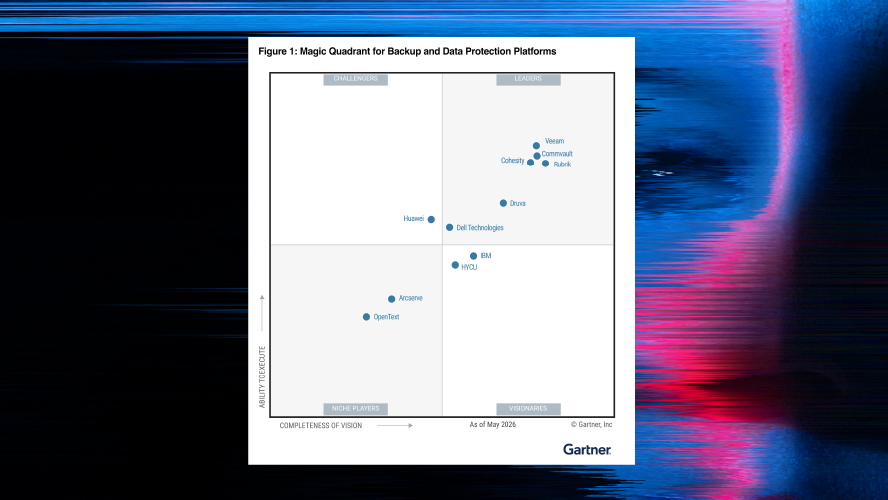
Gartner® Magic Quadrant™

Beyond Disaster Recovery: Perché è necessaria una strategia diversa quando il ransomware colpisce

L’organizzazione resiliente al cyber-rischio: massima preparazione con un ripristino a prova di errore
Capacità correlate
Commvault Cleanroom
Commvault Cleanroom è un processo specializzato di recupero dati che garantisce il recupero sicuro e affidabile di informazioni critiche da dispositivi di archiviazione danneggiati in ambienti in cui la contaminazione dei dati rappresenta un rischio significativo.
Commvault Cleanroom
Commvault Cleanroom è un processo specializzato di recupero dati che garantisce il recupero sicuro e affidabile di informazioni critiche da dispositivi di archiviazione danneggiati in ambienti in cui la contaminazione dei dati rappresenta un rischio significativo.
Backup come servizio (BaaS)
Le soluzioni di backup as a service (BaaS) offrono funzionalità di backup e ripristino dei dati basate su cloud senza la presenza di hardware o apparecchiature fisiche in sede per ospitare e gestire l’infrastruttura di backup.
Backup come servizio (BaaS)
Le soluzioni di backup as a service (BaaS) offrono funzionalità di backup e ripristino dei dati basate su cloud senza la presenza di hardware o apparecchiature fisiche in sede per ospitare e gestire l’infrastruttura di backup.
Recupero dai disastri
Il disaster recovery (DR) è il processo di ripristino dell’infrastruttura IT e delle operazioni di un’organizzazione dopo una grave interruzione o un disastro. L’obiettivo del disaster recovery è ridurre al minimo l’impatto di un evento dirompente e ripristinare le normali operazioni il più rapidamente possibile per ridurre al minimo l’impatto sui processi aziendali e sulla reputazione dell’organizzazione.
Recupero dai disastri
Il disaster recovery (DR) è il processo di ripristino dell’infrastruttura IT e delle operazioni di un’organizzazione dopo una grave interruzione o un disastro. L’obiettivo del disaster recovery è ridurre al minimo l’impatto di un evento dirompente e ripristinare le normali operazioni il più rapidamente possibile per ridurre al minimo l’impatto sui processi aziendali e sulla reputazione dell’organizzazione.